
Workarounds for the VMware KB2059053 ESXi 5.x purple diagnostic screen caused by the E1000 virtual network adapter, including switching guests to VMXNET3.

VMware issued a Knowledge base article detailing a known issue with ESXI Hypervisors failing due to virtual machines using the Virtual Network Adapter (KB2059053).
The ESXI host will show the following symptoms:
Through the DCUI you will see a Purple Diagnostic Screen showing the following information:
@BlueScreen: #PF Exception 14 in world wwww:WorldName IP 0xnnnnnnnn addr 0x0 PTEs:0xnnnnnnnn;0xnnnnnnnn;0x0; - This indicates the virtual machine via WorldName 0xnnnnnnnn:[0xnnnnnnnn]E1000PollRxRing@vmkernel#nover+0xdb9 - This indicates the issue with E1000 Virtual Network Adapter
0xnnnnnnnn:[0xnnnnnnnn]E1000DevRx@vmkernel#nover+0x18a - This indicates the issue with E1000 Virtual Network Adapter 0xnnnnnnnn:[0xnnnnnnnn]IOChain_Resume@vmkernel#nover+0x247 - This indicates the issue with E1000 Virtual Network Adapter 0xnnnnnnnn:[0xnnnnnnnn]PortOutput@vmkernel#nover+0xe3 - This indicates the issue with E1000 Virtual Network Adapter 0xnnnnnnnn:[0xnnnnnnnn]EtherswitchForwardLeafPortsQuick@#+0xd6 0xnnnnnnnn:[0xnnnnnnnn]EtherswitchPortDispatch@#+0x13bb 0xnnnnnnnn:[0xnnnnnnnn]Port_InputResume@vmkernel#nover+0x146 0xnnnnnnnn:[0xnnnnnnnn]Port_Input_Committed@vmkernel#nover+0x29 0xnnnnnnnn:[0xnnnnnnnn]E1000DevAsyncTx@vmkernel#nover+0x190 0xnnnnnnnn:[0xnnnnnnnn]NetWorldletPerVMCB@vmkernel#nover+0xae 0xnnnnnnnn:[0xnnnnnnnn]WorldletProcessQueue@vmkernel#nover+0x486
The Current workaround provided by VMware:
- Use the VMXNET3 virtual adapter
- Disable (Receive-Side Scaling State) on the Windows OS
Disabling (Receive-Side Scaling State) on Windows OS
Use the following Command to check to see if “Receive-Side Scaling State” (RSS) is enabled (usually enabled by default)
Netsh interface tcp show global
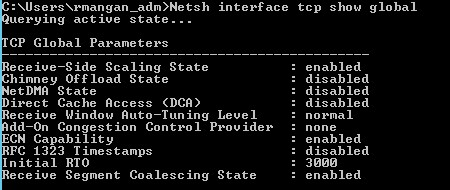
To Disable (RSS) use the following Command in (CMD):
Netsh interface tcp set global rss= disabled

Locating affected Virtual Machines:
To locate the effected Virtual Machines you would need to use the following PowerCLI script I have written.
\# VMware ESXI Script to show Virtual Machines using E1000/e Virtual Network Adapters

\# Created by Ryan Mangan on the 17/04/2014

param (

\[Parameter(Mandatory=$TRUE, HelpMessage="Enter the name of the ESXI Host FQDN")\]

\[String\]

$VMHost,

\[Parameter(Mandatory=$TRUE, HelpMessage="Host Root Password Dual control")\]

\[String\]

$HostPW,

\[Parameter(Mandatory=$TRUE, HelpMessage="Location of exported .txt output file")\]

\[String\]

$exportfile

)

Add-PSSnapin VMware.VimAutomation.Core

ForEach( $VM in (Get-VM) ) { $VM|Where{ $VM|Get-NetworkAdapter|Where{ $\_.ExtensionData -like "\*e1000\*" } } }

Out-File $exportfile
This script would need to be run on a client or vCenter server which has PowerCLI installed.
The issue is resolved in the following updates:
- ESXi 5.5 Update 1 — VMware ESXi 5.5, Patch ESXi550-Update01: ESXi 5.5 Complete Update 1 (KB 2065832; original article retired).
- ESXi 5.1 Update 2 — VMware ESXi 5.1, Patch ESXi510-Update02: ESXi 5.1 Complete Update 2 (KB 2062314; original article retired).
- ESXi 5.0 Patch ESXi500-201401001 — VMware ESXi 5.0, Patch Release ESXi500-201401001 (KB 2065814; original article retired).
Knowledge articles:
VMware ESXi 5.x host experiences a purple diagnostic screen mentioning E1000PollRxRing and E1000DevRx (KB 2059053; original article retired).
Poor network performance or high network latency on Windows virtual machines (KB 2008925; original article retired).