Remote Desktop Services 2012 allows you to publish two types of Session collection on a Remote Desktop Session Host. This can be either a Remote Desktop...
Remote Desktop Services 2012 allows you to publish two types of Session collection on a Remote Desktop Session Host. This can be either a Remote Desktop Session Collection or a Remote App Session Collection. By default you cannot have both types on the Same Session Host. In this post I am going to show you how to configure the Session Host to show both types in the same Session Collection by making a change to the registry.
You can also create a shortcut using MSTSC, as shown in the section on adding a Remote Desktop session to a RemoteApp Session Collection in deploying an RDS 2012 single-server session-based deployment.
Remote Desktop/App Session Collection on a Single RDSH Server
This Lab has been built using Server 2012 R2, but the following actions can be completed on Server 2012 with the same outcomes.
By default a Remote App Session Collection looks like this :
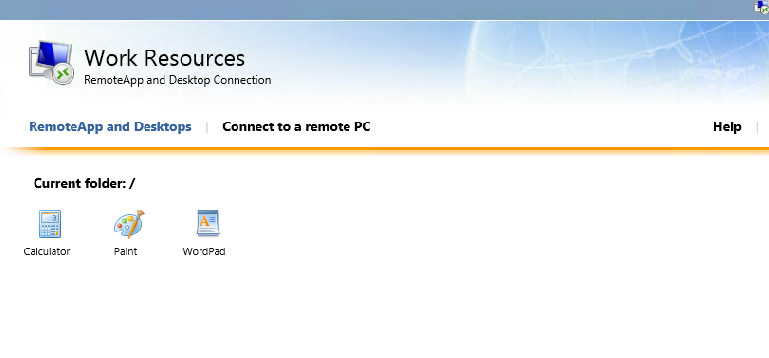
As you can see from the image shown above, Only Remote Apps are shown.
To show the Remote Desktop Session Collection you will need to make a change to the Registry.
HKLM\SOFTWARE\Microsoft\Windows NT\CurrentVersion\Terminal Server\CentralPublishedResources\PublishedFarms\
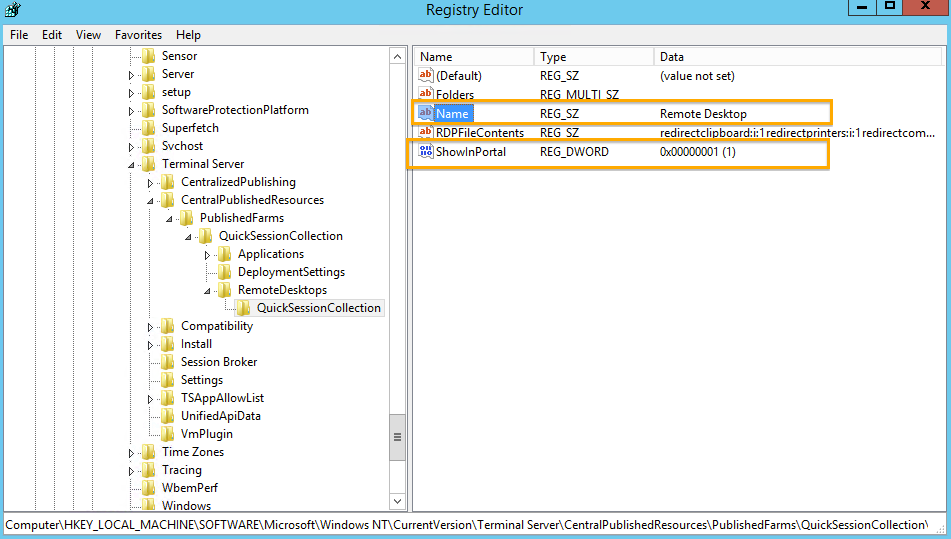
To show the Desktop Session Icon, Change the value (ShowInPortal) to 1 from 0.
You can also rename the Desktop Session Icon name to something more to your liking. To do this, change the value (Name).
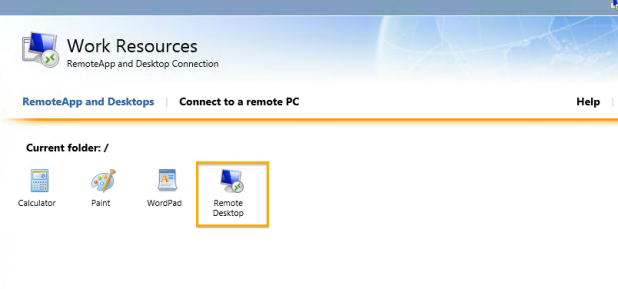
There you have it, a Remote Desktop Session Published in a Remote App Session Collection.