Part 5 of the Kemp LoadMaster and VMware Log Insight series, configuring an ESXi host to forward syslogs to Log Insight from the vSphere Client by setting Syslog.global.logHost to the Kemp UDP virtual service and enabling the outbound syslog firewall rule.
This is a short post leading on from part 4 showing how to configure the Forwarding of Syslog's to the Log Insight Cluster.
It is a fairly simple process to forward syslogs to Log Insight using the Client Interface.
Go to the Configuration Menu under the ESXI Server, select Advanced Settings:
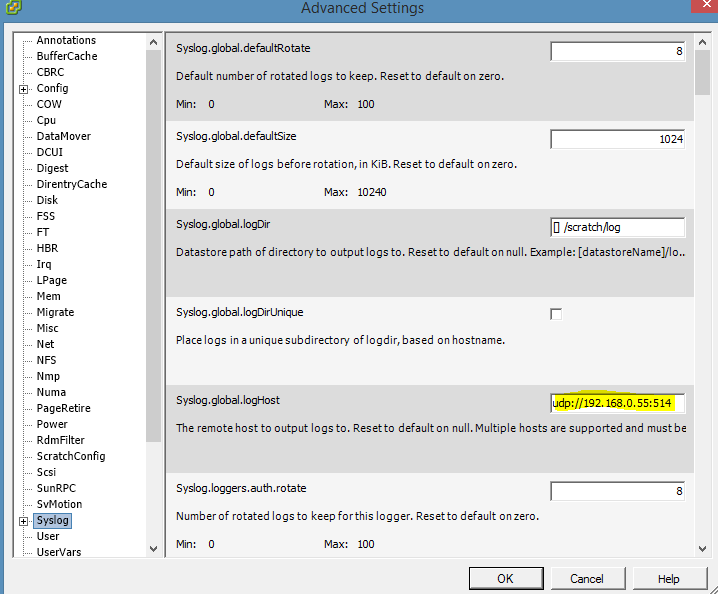
Under Syslog.global.logHost enter the UDP Path of the KEMP Virtual Service "udp://192.168.0.55:514"
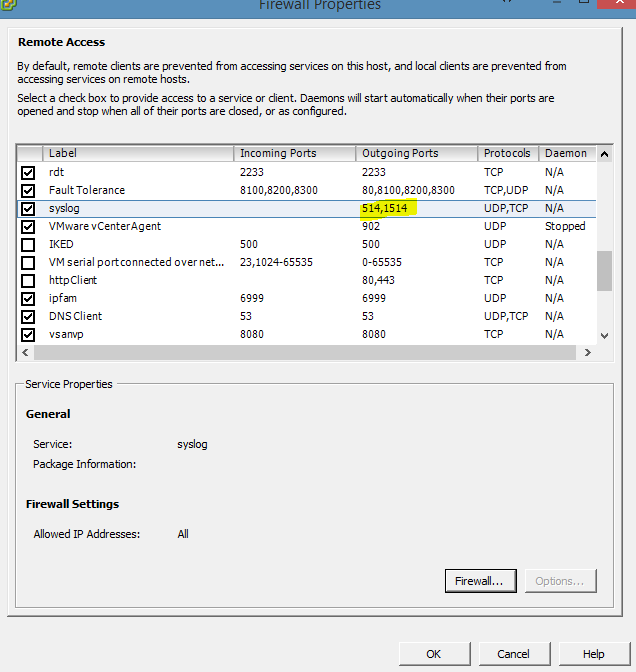
Ensure that the Syslog Firewall Rule is configured for Outbound:
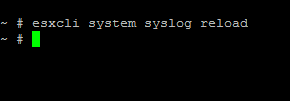
If you have issues with Syslogs Forwarding to Log Insight, you can reload the syslog Service using the ESXCLI.
The Next Post will look at configuring the forwarding of Syslogs through vCenter.