Operational steps to force a stuck VMware virtual machine to power off from the ESXi shell using esxcli vm process list and esxcli vm process kill, useful when the vSphere client and host web console are unresponsive.
I recently had a issue with a VM failing to shut down via the client and web console.
I found the best way to resolve this would be to force a shutdown via the ESXI shell.
Connect to the ESXI Shell using Putty or other terminal console using SSH.
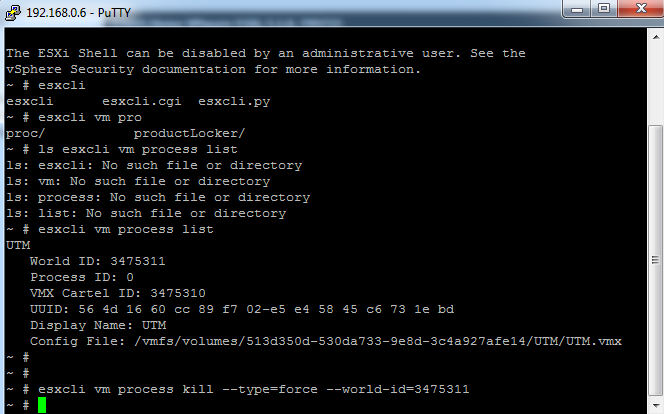
You would first need to get the list of Virtual machines running on the host. VM's are identified by Display Name, World ID and UUID. You would also see the vmx configuration file.
esxcli vm process list
You would see the following output:
UTM World ID: 3475311 Process ID: 0 VMX Cartel ID: 3475310 UUID: 56 4d 16 60 cc 89 f7 02-e5 e4 58 45 c6 73 1e bd Display Name: UTM Config File: /vmfs/volumes/513d350d-530da733-9e8d-3c4a927afe14/UTM/UTM.vmx
You would need the World ID when running the Kill command:
esxcli vm process kill --type=[soft,hard,force] --world-id=WorldNumber