Clarification of which parts of MSIX and App Attach are generally available and what the current support line looks like.
Introduction
Over the last couple of weeks, I have been discussing MSIX and app attach with the community and customers. I thought it would help others by outlining the support and availability for Both MSIX and MSIX app attach.
This article needed a 2026 correction pass because the original version was written when the Azure control plane experience for App Attach was still very young. The concepts still hold. The support line has moved.
MSIX
For those who do not know, "MSIX" is Microsoft's modern packaging format which has been around since 2018. It is the mainstream Microsoft package model for modern Windows application delivery and it remains strategically important for application modernization.
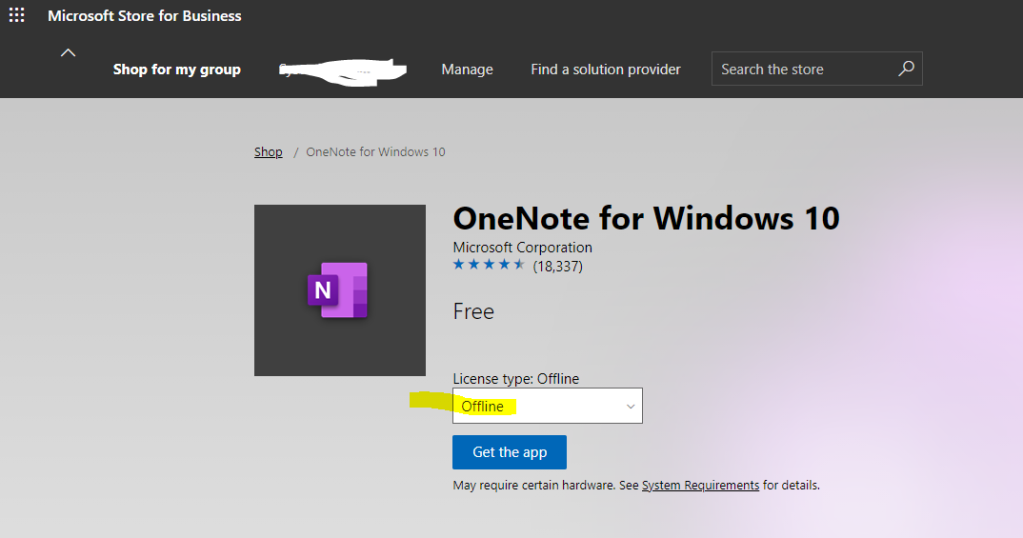
The one part of the old conversation I would retire is the old Microsoft Store for Business offline-download angle. That service has gone. In practice, the realistic paths now are vendor-supplied MSIX packages, the MSIX Packaging Tool, or your own repackaging pipeline.
One good example of delivering a MSIX to the Machine is to use PowerShell:
Add-AppProvisionedPackage -online -packagepath "C:\\msix\\RyansApp-.msix"
Please note this is delivered for logged on users instantaneously and for those who are not, its delivered on sign in.
More info on PowerShell deployment: Add provisioned apps to a Windows image - Windows Deployment | Microsoft Learn
More info on MSIX: MSIX documentation - Microsoft Learn
MSIX App attach
There has been some confusion regarding the differences between MSIX and MSIX app attach.
"MSIX app attach" was the original name many of us used in the WVD era. In current Azure Virtual Desktop documentation the feature is generally referred to as App Attach because the delivery model now supports MSIX/Appx and App-V package sources.
For MSIX and Appx, the app is delivered in an "expanded" state on a VHDX, VHD, or CimFS image. What this means is the package is prepared for delivery via a virtual disk or Cim image rather than being traditionally installed into the base OS.
The benefit of MSIX app attach is the ability to stage and register apps to users on the fly via attaching a disk or cim image without installing /registering the MSIX locally to the host.
Mounting the disk, staging the app, so the system can see it, and then registering the application for the required users. MSIX app attach allows you to remove the need to install MSIX's directly on the operating system, providing Dynamic Application Delivery. I call this DAD for short (jokes in the comments section, please!).
Adding and removing applications with no impact on the Operating system is always a benefit. with the added benefits of MSIX, there is a much cleaner Operating system image than traditional install methodologies.
In summary, Departmental or group applications can be added via groups on the fly, and I would recommend that these are deployed using MSIX app attach. Common applications like Office and Adobe should really be installed on the Operating system unless you have a specific need. Again, depends on needs and requirements.
If a user needs an app in session, you can deliver the new app or the updated/newer version during session. There are many benefits to MSIX app attach and specifically in a VDI environment where you manage multiple images or single images with all apps installed. This makes it harder to maintain and rollout updated OS versions/patching and application updates/patches etc.
MSIX app attach does not improve the percentage of success rate of delivering apps through the use of MSIX. MSIX app attach enables you to add and remove apps without installing\registering the MSIX package locally to the device.
More info on App Attach: App Attach in Azure Virtual Desktop - Microsoft Learn
General Availability
This is some important information on the support and General Availability of both MSIX and MSIX app attach.
General Release / current support line:
- MSIX packaging itself is fully mainstream and documented in the Windows application packaging stack.
- Azure Virtual Desktop App Attach is a supported application-delivery model.
- The Azure portal experience is no longer the preview-era story that originally triggered this article.
Current package support:
- MSIX / MSIX bundle
- Appx / Appx bundle
- App-V
Current operating system support in Azure Virtual Desktop:
- Windows 10 Enterprise and Windows 10 Enterprise multi-session
- Windows 11 Enterprise and Windows 11 Enterprise multi-session
- Windows Server 2022
- Windows Server 2025
What about Server 2019?
Server 2019 is still the line many people remember from the original discussion, but it is no longer where I would point new App Attach work. Microsoft now documents App Attach support on Windows Server 2022 and 2025 in Azure Virtual Desktop.
What about CimFS?
CimFS remains the most interesting image format from a performance perspective, but Microsoft now recommends it mainly when your session hosts are running Windows 11. For mixed estates or older host choices, VHDX is the safer default than VHD.
MSIX and MSIX app attach are not ready for use?
This is a matter of opinion. I like to keep an open mind on technologies and the current and future potential. There are many supported applications which can use MSIX and MSIX app attach today. Conversion of older applications can be problematic subject to how they have been developed and the associated dependencies required. These apps may require package support framework fixups, but there is a good percentage of applications which support MSIX with and without package support framework fixups.
See the video below showing Foxpro running in a MSIX package.
I believe all technologies have good and bad fits. As we all know, every environment and every business is different. It's important to assess and understand the application estate before you make a decision. Microsoft is devoted to MSIX, and it will only get better and better!
The question I have, do you want to complete an application migration project and then have to start again in two years? If I can avoid it, I would!
https://docs.microsoft.com/en-us/azure/virtual-desktop/partners#ssh2
MSIX partners - MSIX | Microsoft Docs
What does this all mean?
Microsoft supports the API and application framework, and Azure Virtual Desktop supports App Attach as a delivery model. So the old "wait for the management portal to become fully real" concern is no longer the key question.
Vendors Like AppVentix, VMware AppVOLs, Nerido
You will note that AppVentix support AppV providing the ability to stage your transition to MSIX app attach.
So can you use MSIX app attach inside / outside of Windows Virtual Desktop ?
The short answer is "yes"
Physical Windows, other VDI environments, and DaaS are still part of the conversation. The more precise answer now is: the App Attach APIs can be used outside Azure Virtual Desktop for local testing, but the Azure management plane belongs to Azure Virtual Desktop.
Useful links:
A Deep Dive into MSIX App Attach – Windows Virtual Desktop – Ryan Mangan's IT Blog
App Attach in Azure Virtual Desktop - Microsoft Learn
FAQ
- How do I Get an MSIX Package ? You can repackage applications into MSIX, or you can contact your software vendor for an MSIX. The old Microsoft Store for Business offline path is no longer the modern answer.
- Can I run two versions of the same application at the same time? To use the same version of the MSIX package multiple times, you need to modify the Package manifest.
- Does MSIX app attach support MSIX auto-update? MSIX app attach doesn't support auto-update for MSIX applications.
- Does MSIX and MSIX app attach support self-assigned code signed certificates? Yes, you need to ensure that the code signed certificate is installed on every device using MSIX's with self-assigned certificates.
- Do you need to setup machine-level permissions to file shares for MSIX app attach? If you are staging the applications on a machine boot, you will need to ensure the machine has the correct permissions to access the network share.
- Can I use the MSIX app attach outside of Windows Virtual Desktop? For local testing of the attach APIs, yes. Microsoft documents that local testing path separately. The Azure control plane experience remains an Azure Virtual Desktop feature.
- Does MSIX app attach use FSLogix? The concept of using a virtual disk to host the data is the same. However, MSIX app attach does "not" use FSLogix. MSIX uses Microsoft's native APIs and application framework. The short answer is no.
- Can I use CIMFS outside of Windows Virtual Desktop? Yes, but for Azure Virtual Desktop application images Microsoft mainly recommends CimFS when the session hosts are running Windows 11.
- Which MSIX image type is recommended? Today I would say VHDX as the general safe choice, and CimFS when you are on Windows 11 and want the performance benefits. I would not recommend investing in plain VHD for new work.
- Do you have to maintain and manage MSIX images? Yes, these will not auto-update, and you will need to patch manage. This can be automated. Automated processes can be completed in a matter of hours.
- Can you use MSIX app attach and other application delivery technologies together in the same environment? Yes, you can; MSIX app attach can be used as the application delivery method of choice or in parallel with other solutions.