Firewall and perimeter security considerations for Azure Virtual Desktop, comparing Azure Firewall and third-party appliances and highlighting the current required outbound endpoints.
Introduction:
This article covers both firewall and perimeter security considerations when deploying or enhancing an existing WVD Deployment. It would not be wise to deploy a Windows Virtual Desktop solution with users directly connecting to the public network without some form of security provision. In this article, we will look at the options available and some of the considerations needed for deploying the Azure firewall or a third party firewall for Windows Virtual Desktop.
The core design still applies in 2026, but the exact Microsoft endpoints do move over time and WVD is now Azure Virtual Desktop (AVD). So keep the architecture thinking from this post, but treat the current Microsoft endpoint list as the source of truth whenever you build or troubleshoot.
Perimeter security - Why:
Deploying a third party firewall provides the added benefits of content filtering, gateway antivirus and application control features amongst others. Content filtering is a must for some industries and without this, it would not be possible to implement Windows Virtual Desktop. Take Education for example, safeguarding and education friendly content control. This cannot be achieved out of the box with WVD. Some may turn to third party applications to achieve the content filtering objective, however using localised applications for such functions does have a performance cost associated within a host pool.
There are many firewall options available to use and you can find these on the Azure Market place:
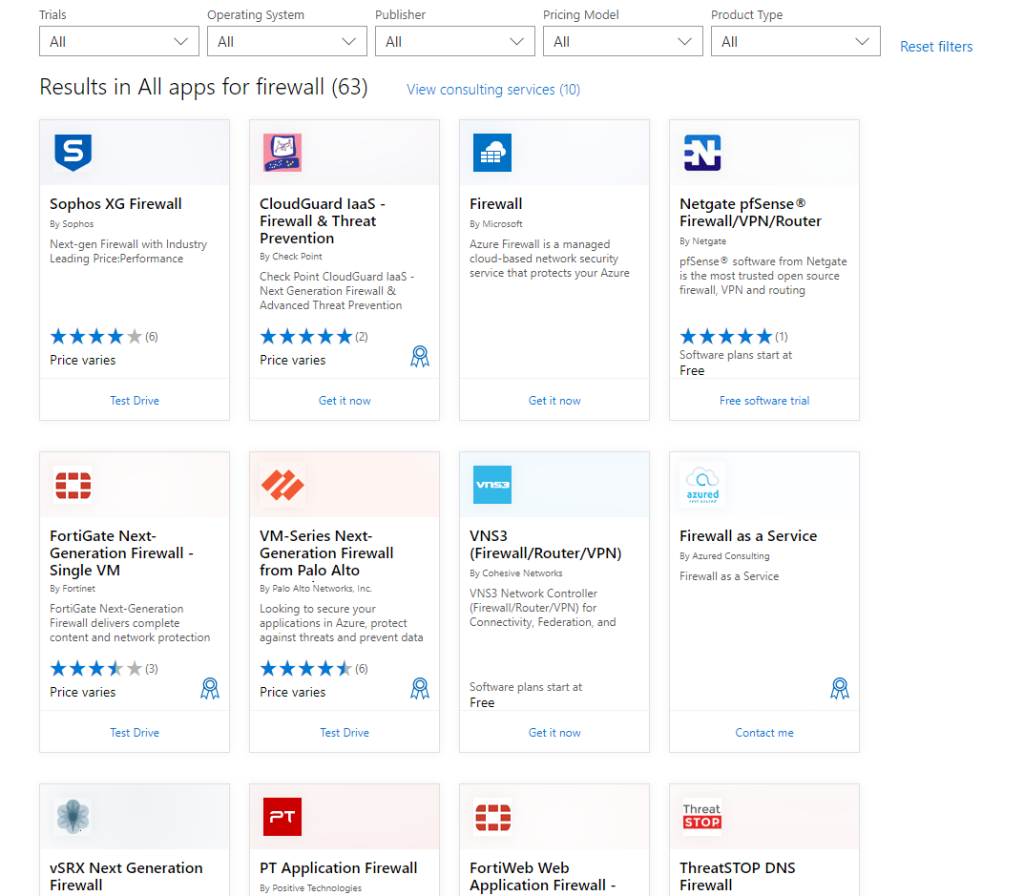
Azure Marketplace - Firewalls
Enhancing Security using a third party firewall:
As shown in the image below, you can see that a third party firewall can sit between multiple subnets on a VNet. In this example we have a LAN subnet where local azure resources reside and a WAN subnet where we assign Azure Public IP addresses and NAT across.
You will note that the security features can inspect locally between services as well as ingress and egress traffic to and from the public network. The added value of IPS and packet inspection should be noted.
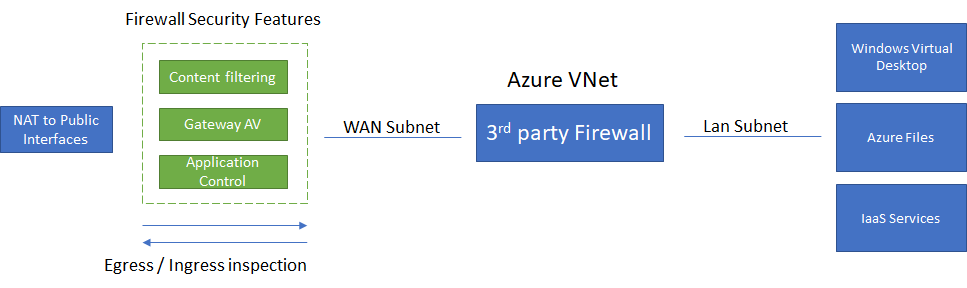
Third Party Firewall Example Deployment
Using Azure's Firewall:
You don't have to use a third party firewall, There is the option to use Microsoft Azure's Firewall.
There are some differences to a third party firewall including the security features mentioned above. Azure Firewall now gives you the cleaner Microsoft-native route for AVD because you can use the WindowsVirtualDesktop service tag and the Azure Virtual Desktop FQDN tag in policy rather than maintaining a brittle manual list. One of the key benefits of Azure Firewall is that it is vastly scalable enabling automation. The other big design point now is that DNS proxy must be enabled if you want to use FQDN filtering in network rules.
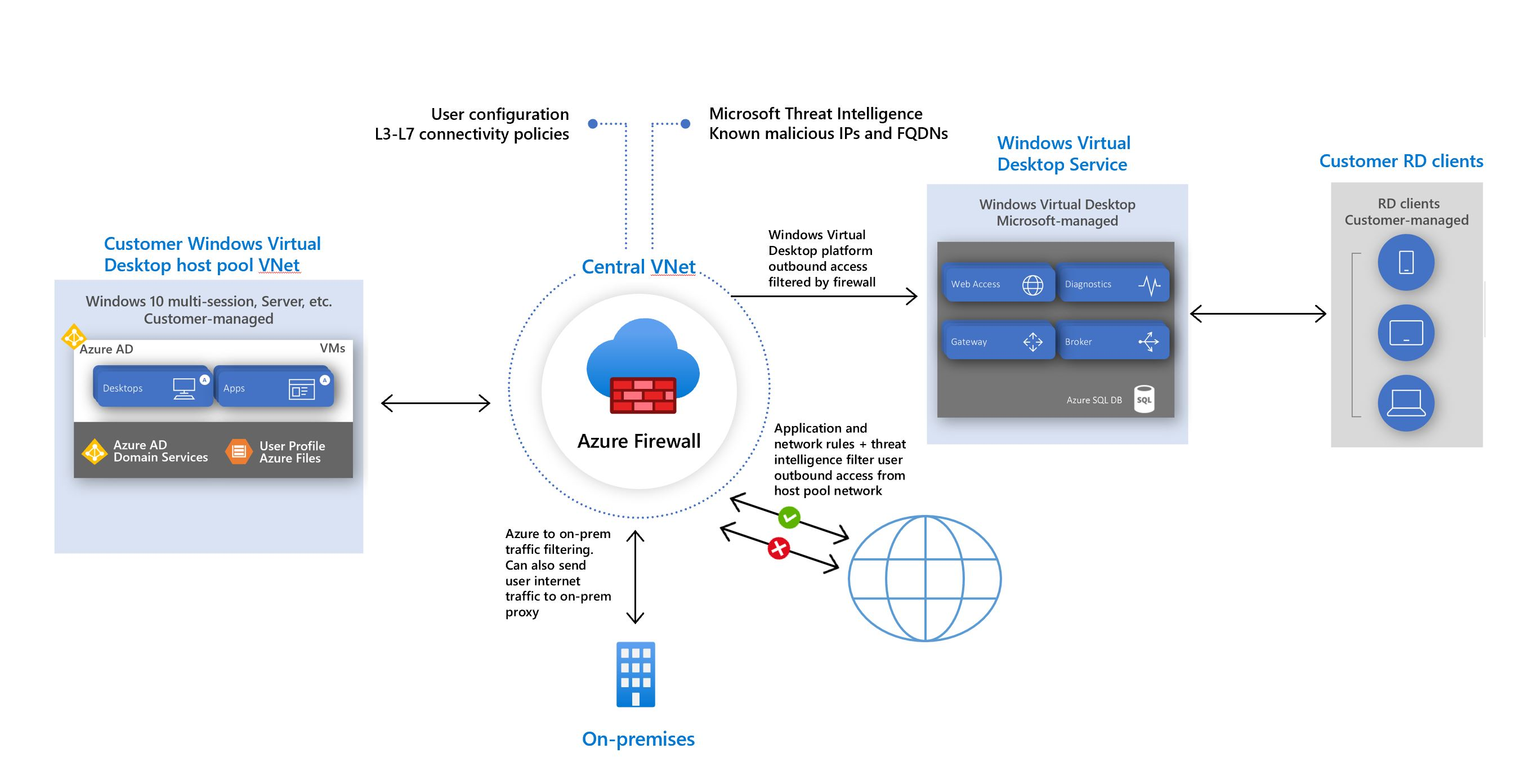
Windows Virtual Desktop architecture
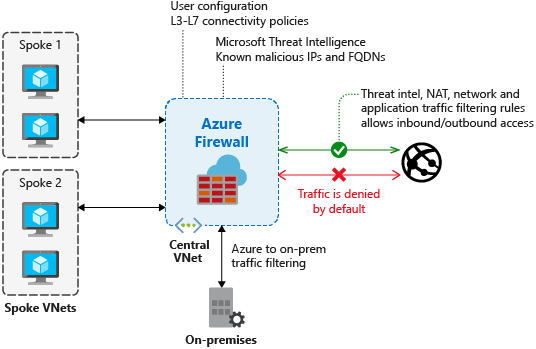
Azure Firewall Overview
Issues you may experience if the firewall is not configured / correctly:
There are many issues that can occur when a firewall is not configured correctly for Windows Virtual Desktop. The two most common issues when deploying a firewall to Azure are DNS and KMS related. My suggestion would be to check all the required ports and URL's for each Azure service before deploying when a firewall is in play. I have listed the URL's and ports required for Windows Virtual Desktop below.
There are now two extra gotchas I would add:
- Do not use TLS inspection or SSL termination on Azure Virtual Desktop traffic.
- Do not force all AVD broker and gateway traffic through Azure Firewall with only a default route. Microsoft now recommends a direct route for the WindowsVirtualDesktop service tag to the Internet to avoid disconnects during firewall scale-in events.
The following is not a extensive list of issues you may see / experience. however, for those who are having issues, it may help:
- Windows 10 not Activated - KMS
- Unable to access the internet - DNS
- Unable to connect to a Host pool - Service traffic blocked
- Azure authenticator not working - service blocked
- Agent and SXS stack not updating - check rules, service being blocked or DNS issue.
To Diagnose issues, you can use PSPING to test a FQDN and port.
WVD required Firewall Rules:
Here is the list of Azure firewall rules I now check first when reviewing an AVD deployment. It is intentionally focused on the important current items rather than trying to freeze every possible optional endpoint forever.
| Address | Protocol / port | Purpose | Service Tag |
| login.microsoftonline.com | TCP 443 | Authentication to Microsoft Online Services | AzureActiveDirectory |
| *.wvd.microsoft.com | TCP 443 | Service traffic including TCP-based RDP connectivity | WindowsVirtualDesktop |
| 51.5.0.0/16 | UDP 3478 | Relayed RDP connectivity | WindowsVirtualDesktop |
| *.service.windows.cloud.microsoft | TCP 443 | Service traffic | WindowsVirtualDesktop |
| *.windows.cloud.microsoft | TCP 443 | Service traffic | None |
| *.windows.static.microsoft | TCP 443 | Service traffic | None |
| mrsglobalsteus2prod.blob.core.windows.net | TCP 443 | Agent and SxS stack updates | Storage |
| *.prod.warm.ingest.monitor.core.windows.net | TCP 443 | Agent diagnostic traffic | AzureMonitor |
| gcs.prod.monitoring.core.windows.net | TCP 443 | Agent traffic | AzureMonitor |
| catalogartifact.azureedge.net | TCP 443 | Azure Marketplace | AzureFrontDoor.Frontend |
| wvdportalstorageblob.blob.core.windows.net | TCP 443 | Azure portal support | AzureCloud |
| azkms.core.windows.net | TCP 1688 | Windows activation | Internet |
| oneocsp.microsoft.com | TCP 80 | Certificate checks | AzureFrontDoor.FirstParty |
| ctldl.windowsupdate.com | TCP 80 | Certificate checks | None |
Also remember the Azure platform IPs 169.254.169.254 and 168.63.129.16. These are not normal Internet destinations and should not be intercepted, proxied, or redirected. Blocking them can break provisioning and health monitoring.
RD Client rules:
This is the list of rules that should be applied to the RD Client, Company endpoint device to ensure no client related issues.
| Address | Outbound TCP port | Purpose | Client(s) |
| login.microsoftonline.com | 443 | Authentication | All |
| *.wvd.microsoft.com | 443 | Service traffic | All |
| *.servicebus.windows.net | 443 | Troubleshooting data | All |
| go.microsoft.com | 443 | Microsoft FWLinks | All |
| aka.ms | 443 | Microsoft URL shortener | All |
| learn.microsoft.com | 443 | Documentation | All |
| privacy.microsoft.com | 443 | Privacy statement | All |
| *.cdn.office.net | 443 | Client updates | Windows Desktop |
| graph.microsoft.com | 443 | Service traffic | All |
| windows.cloud.microsoft | 443 | Connection center | All |
| windows365.microsoft.com | 443 | Service traffic | All |
| ecs.office.com | 443 | Connection center | All |
Summary:
This article covers both Azure Firewall and third party firewall deployments with Windows Virtual Desktop. Both Options have been covered and I have provided a high level insight into diagnosing issues related WVD firewall issues.
I personally prefer to use a third party firewall with Windows Virtual desktop as it can allow you to standardise a firewall technology across platforms / multi cloud. However For those who just need a firewall or are looking for a technology which is scalable and can be automated, the Azure Firewall is the one for you.
Further reading:
https://learn.microsoft.com/en-us/azure/virtual-desktop/overview
https://learn.microsoft.com/en-us/azure/firewall/overview
https://learn.microsoft.com/en-us/azure/firewall/protect-azure-virtual-desktop
https://learn.microsoft.com/en-us/azure/virtual-desktop/required-fqdn-endpoint
https://azuremarketplace.microsoft.com/en-us/marketplace/apps?search=firewall&page=1