Package identity changes how Windows treats a process. Detecting it early prevents bad assumptions in packaged and unpackaged app flows.

Determining whether a process is running with package identity is a fundamental requirement for modern Windows development, yet it is still a detail that gets missed during early architecture work. Once package identity enters the picture, the operating system changes how certain features, activation paths, and app-data patterns behave.
In a recent technical deep dive, Howard Kapustein, a Principal Software Engineer at Microsoft, outlined the canonical ways to identify whether a process is packaged. This post breaks that logic down using the Feynman Technique so the model is easier to reason about.
The Premise: The challenge of identity
Windows supports both packaged and unpackaged processes. A packaged process carries package identity from its manifest. In practice, that can come from a full MSIX package or from packaging with external location. An unpackaged process does not have that identity.
That distinction matters because several Windows capabilities are gated on package identity at runtime. Notifications, background tasks, share targets, startup tasks, package extensions, and some Windows Runtime APIs depend on it. If your code assumes identity is present when it is not, it can call the wrong APIs, store configuration in the wrong place, or fail only in one deployment model.
There is also an important nuance here. Package identity is not the same thing as running in a strict AppContainer sandbox. Many packaged desktop apps still run as full-trust processes. Identity and isolation are related, but they are not interchangeable.
The Analogy: The airport security clearance
To understand package identity, think of a process like a person walking through a large international airport.
An unpackaged process is like a visitor who has arrived at the airport but does not have a boarding pass. They can still exist in the building, move through public spaces, and access what is available in the open terminal. But they do not have the verified identity needed to enter the managed parts of the journey.
A packaged process is like a passenger with a confirmed boarding pass and a verified passport. That identity tells the airport exactly who they are and which services are tied to them. Because the passenger can be identified properly, the airport can route them to the right gate, connect them to the right baggage system, and grant access to the services that depend on verified travel status.
If the passenger tries to board without that identity, they are stopped. Similarly, if an application assumes it has package identity when it does not, the process will eventually hit a feature boundary and fail at runtime.
The Breakdown: How the code identifies the process
In technical terms, this is a process-level question, not just an application-level one. An application can have multiple processes, and runtime identity needs to be verified in the process that is actually making the call. Some helper or out-of-process components may not present the same runtime context as the main executable.
The primary Win32 API for checking this is GetCurrentPackageFullName.
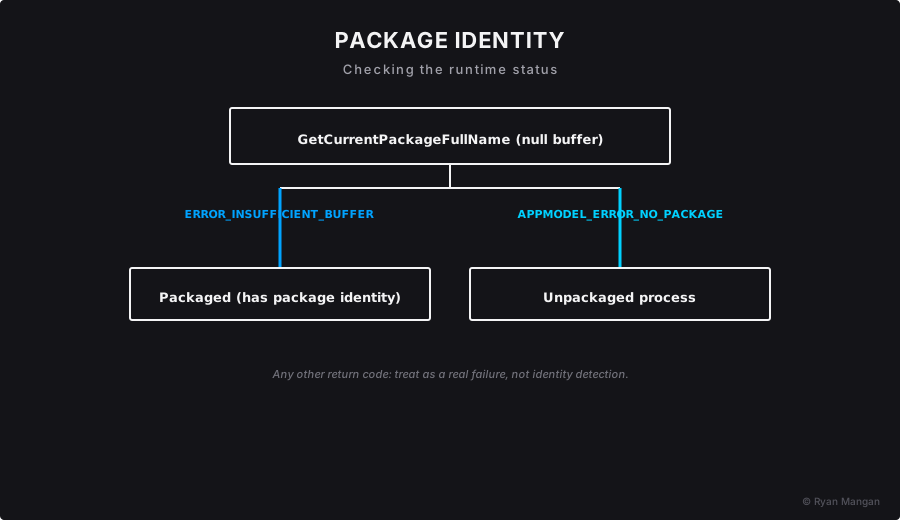
The logic depends on a very specific behavior of the function. If you call GetCurrentPackageFullName with a null buffer, Windows tells you what kind of situation you are in based on the return code.
There are three meaningful outcomes:
ERROR_INSUFFICIENT_BUFFER: In this detection pattern, this is the success signal. It means Windows recognized package identity for the current process and is telling you that a real buffer would be required to retrieve the package full name.APPMODEL_ERROR_NO_PACKAGE: The process is running without package identity.- Any other return value: A genuine error occurred and should be handled as an actual failure state.
That is why the test looks slightly counterintuitive at first glance. You are deliberately calling the API in a way that produces a known return code so you can infer whether package identity exists.
C++ implementation
The canonical native implementation uses appmodel.h, calls GetCurrentPackageFullName, and checks the return code. If the code is ERROR_INSUFFICIENT_BUFFER, the process has package identity. If it is APPMODEL_ERROR_NO_PACKAGE, it does not.
C# implementation
In C#, the principle is the same, but you typically reach the API through P/Invoke. The implementation usually wraps GetCurrentPackageFullName in a small boolean helper and evaluates the same return codes.
The Value: Why identity matters to the architecture
This is where the technical detail becomes an architectural concern.
If an application is intended to run with package identity, the system-managed app data store is often the right place for app-specific settings. Microsoft documents ApplicationData.LocalSettings and the broader local app data store as the packaged app model for settings and state that should survive updates. That data is also managed and removed cleanly when the app is uninstalled.
An unpackaged executable does not get those system-managed app data stores. It needs an explicit storage strategy instead, such as direct file I/O, a known configuration path, or another deliberate settings mechanism.
That gives architects and developers a few practical advantages:
- Hybrid deployment models. One codebase can behave correctly whether it runs with package identity or as a traditional executable.
- Graceful degradation. Identity-dependent features can be disabled cleanly instead of failing at runtime.
- Better telemetry and diagnostics. You can separate packaging-related defects from general application defects much faster.
Failing to account for identity is one of the easier ways to create an "it works on my machine" problem, especially when developers test in an unpackaged debug flow while users run the final packaged deployment.
The check to apply
When designing your next Windows application or modernizing an existing one, ask a simple question early:
Does the process verify whether package identity is actually present before it uses identity-dependent features?
If the answer is no, there is a good chance the design is relying on an assumption that only holds in one runtime context.
That is the real value of this check. It is not just defensive coding. It is a small architectural test that keeps deployment reality aligned with application behavior.