Historical look at delegated access in the original Windows Virtual Desktop release, with notes on the current Azure Virtual Desktop RBAC model.
Delegated Access overview:
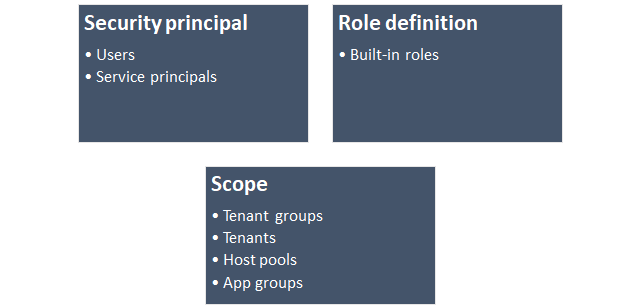
A useful component that comes with Windows Virtual Desktop is the WVD delegated access model. This function lets you define and control access at various levels of the WVD Structure. The role assignment has three key components, which include: Security principal, Role definition and Scope. One point to note is that WVD delegated access is based on Azure's RBAC model. Delegated access could prove to be extremely useful for multi tiered IT support teams allowing you to manage and control access to WVD at different levels.
This article reflects the classic Windows Virtual Desktop model where delegated access was managed through the Microsoft.RDInfra.RDPowerShell module and applied across tenant groups, tenants, and host pools. In Azure Virtual Desktop today, delegated administration is handled with standard Azure RBAC role assignments on Azure resources.
Understanding Role Assignment:
As you can see in the image below, the delegated access model has been broken down in to three components. The Security Principle is for users and service principles. The Role Definition is for built-in roles "RDSRoleAssignment" and Scope is the section of WVD were you would want to assign delegated permissions. A quick Role Assignment Example: I need to assign Bob@rmitblog.cloud as "RDS Owner" to the tenant group. Add the "-tenantname" for the tenant.
New-RdsRoleAssignment -TenantGroupName yourtenantgroup -TenantName Example -RoleDefinitionName "RDS Owner" -SignInName Bob@rmitblog.cloud -AadTenantId "xxxx-xxxx-xxxx-xxxx-xxxx"
An Example of assigning delegated access in an organisation:
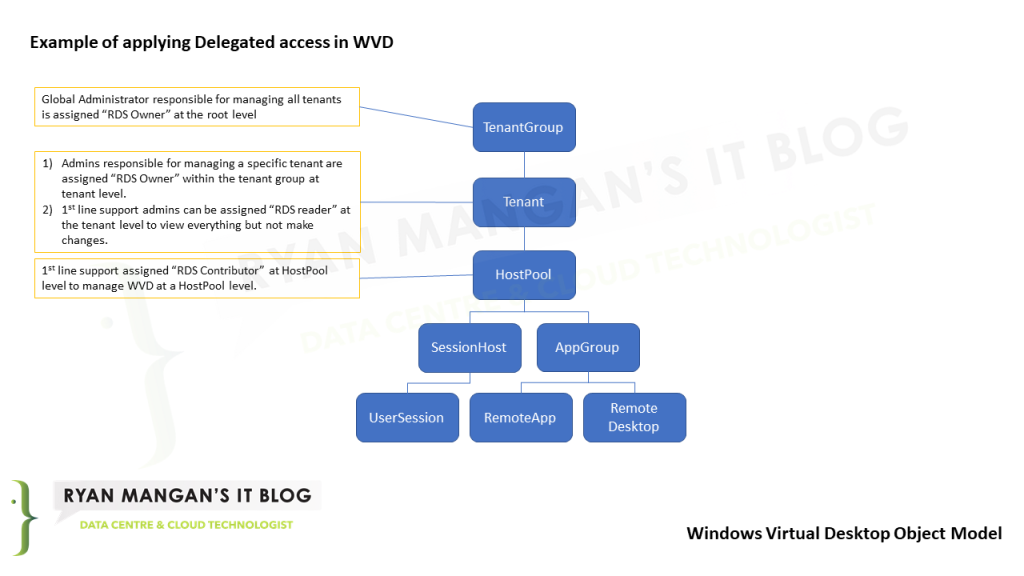
In this example i have assigned delegated access to the following scope: Tenant groups, Tenants and Host Pools. The diagram below shows a Global Admin who has full control at the tenant group level, a tenant admin who has been assigned full control at a single tenant level (one specific tenant), one IT support user assigned with read only access at the tenant level and finally the same IT support admin assigned RDS contributor access at the HostPool Level.
What this means is the Global admin has full control of all tenants including security. The Tenant admin has full control of a single tenant for security on that tenant and the IT admin can only view the assigned tenant and has access at the host level but no access to resources.
Built in Roles:
The following roles are included in WVD's Delegated access model.
- An RDS Owner can manage everything, including access to resources.
- An RDS Contributor can manage everything but access to resources.
- An RDS Reader can view everything but can't make any changes.
- An RDS Operator can view diagnostic activities.
These role names are specific to the classic service and are the main reason this post should be read as archive guidance. In Azure Virtual Desktop today, you would normally work with Azure RBAC roles such as:
Desktop Virtualization ContributorDesktop Virtualization ReaderDesktop Virtualization User
One important detail in the modern model is that Desktop Virtualization Contributor can manage Azure Virtual Desktop resources, but if you also need to assign users or groups to those resources, you typically need User Access Administrator as well.
Example Delegated Access configuration:
#Global Admin access to tenant group
New-RdsRoleAssignment -TenantGroupName yourtenantgroup -RoleDefinitionName "RDS OWner" -SignInName GlobalAdmin@rmitblog.cloud
#Localised tenant admin | access to a specific tenant only
New-RdsRoleAssignment -TenantGroupName yourtenantgroup -TenantName RDSTEST01 -RoleDefinitionName "RDS Owner" -SignInName Tenantadmin@rmitblog.cloud
#read only tenant access for 1st line engineer
new-RdsRoleAssignment -TenantName RDSTEST01 -RoleDefinitionName "RD Reader" -SignInName 1stlineadmin@rmitblog.cloud
#Contributor access to hostpool level
new-RdsRoleAssignment -TenantName RDSTEST01 -HostPoolName RMITBLOGDESKTOPS -RoleDefinitionName "RDS Contributor" -SignInName 1stlineadmin@rmitblog.cloud
Reviewing Role Assignment :
You can review role assignments using the get-RdsRoleassignment cmdlets:
RoleAssignmentId   : 00000000-0000-0000-0000-00000000000
 Scope              : /Default Tenant Group/RDSTEST01/RMITBLOGDESKTOP
 TenantGroupName    : yourtenantgroup
 TenantName         : RDSTEST01
 HostPoolName       : RMITBLOGDESKTOPS
 DisplayName        : Test Account
 SignInName         : 1stlineadmin@rmitblog.cloud
 GroupObjectId      : 00000000-0000-0000-0000-00000000000
 AADTenantId        : 00000000-0000-0000-0000-00000000000
 AppId              :
 RoleDefinitionName : RDS Contributor
 RoleDefinitionId   : 00000-0000-0000-0000-000000000000
 ObjectId           : 0000-0000-0000-0000-000000000000
 ObjectType         : User
 Item               :
As you can see from the PowerShell output above, the 1st line admin has been assigned the RD Contributor permissions at the host-pool level, allowing the 1st line admin to manage everything excluding security access to resources.
PowerShell cmdlets for role assignments for WVD:
Get-RdsRoleAssignmentdisplays a list of role assignments.New-RdsRoleAssignmentcreates a new role assignment.Remove-RdsRoleAssignmentdeletes role assignments.
Current Azure Virtual Desktop model:
If you are delegating access in Azure Virtual Desktop today, the practical translation is:
- Scope access at the Azure resource level, such as the workspace, application group, or host pool.
- Use Azure RBAC to assign the least-privilege built-in role required.
- Treat the old tenant-group and
RDS Ownerstyle model as classic-service history rather than the current operational design.
Summary:
For smaller classic WVD deployments, you may only have needed to configure the RDS Owner role and leave it at that. For larger deployments, delegated access was and still is an important operational pattern.
What changed is the implementation. Azure Virtual Desktop now uses Azure-native RBAC on Azure resources, so the key lesson from this article is not the old cmdlets themselves. It is the access-design principle: define clear scope, assign least privilege, and separate operational administration from user-assignment rights.
Useful Links:
- https://learn.microsoft.com/en-us/azure/virtual-desktop/delegated-access-virtual-desktop
- https://learn.microsoft.com/en-us/azure/virtual-desktop/rbac
Any questions, please feel free to comment.