A remastered guide to Azure Virtual Desktop load balancing, explaining when to use breadth-first, depth-first, and scaling plans in modern pooled host pools.
This article originally covered Windows Virtual Desktop load balancing during the launch-era service model. The core design choice still matters, but the details have changed enough that the original guidance needed a full remaster.
Today the question is not whether Azure Virtual Desktop can balance sessions. It can. The real design decision is how you want a pooled host pool to trade off user experience, cost, and scale-down behavior.
What still matters from the original post
The underlying concept still holds up:
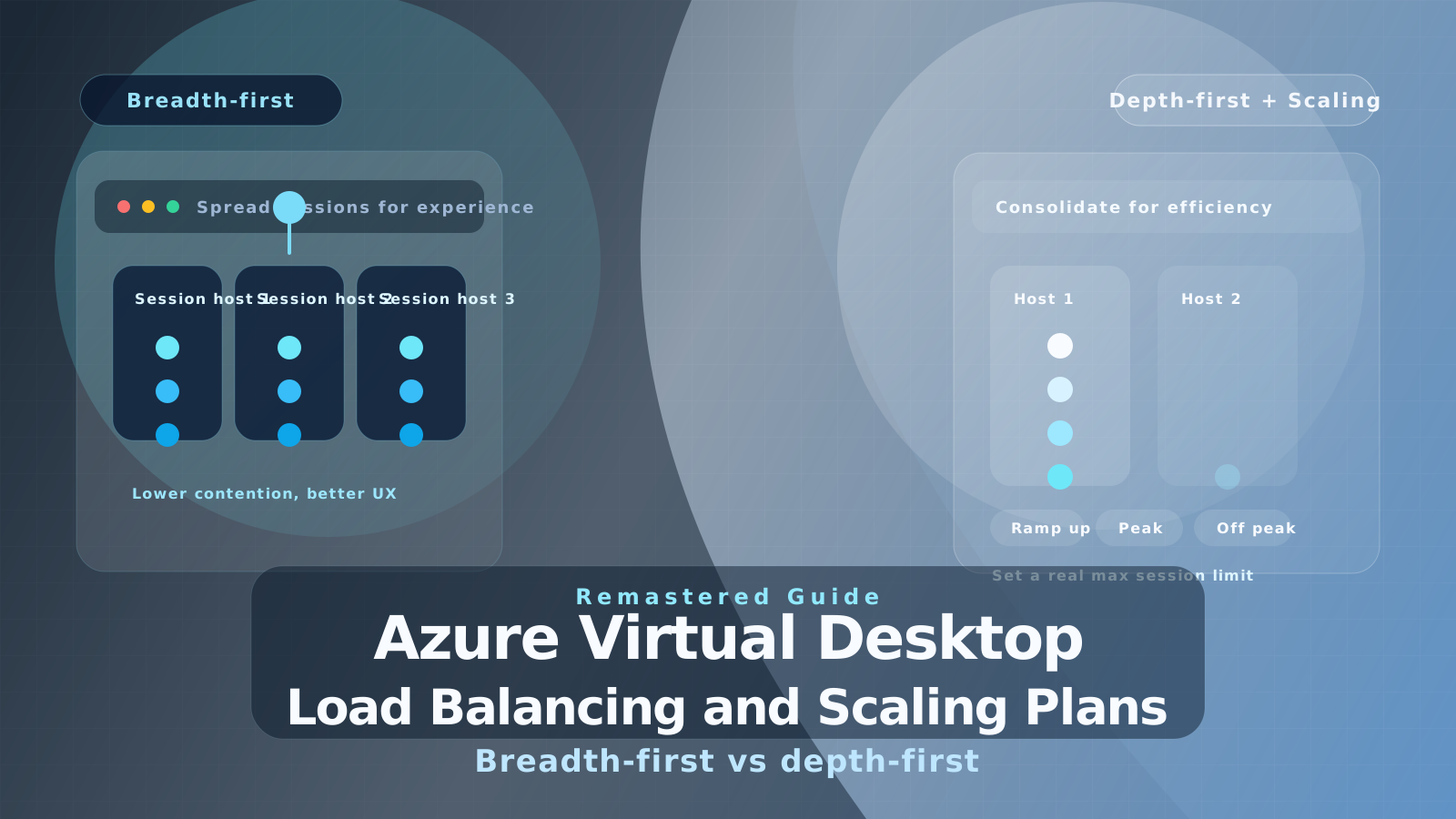
- Breadth-first spreads sessions more evenly across session hosts.
- Depth-first fills one host before moving to the next.
- The choice should be made per pooled host pool, not once for the whole platform.
The parts that aged out are the old service names, the classic WVD cmdlets, and the assumption that the best automation path is an older dynamic-scale script running on a schedule.
The modern Azure Virtual Desktop model
Azure Virtual Desktop still supports two load-balancing algorithms for pooled host pools:
- Breadth-first
- Depth-first
These algorithms do not apply the same way to personal host pools, where users are effectively mapped to their own desktop.
There are also some behaviors that remain important regardless of which algorithm you choose:
- If a user reconnects and already has an active or disconnected session, Azure Virtual Desktop sends them back to that existing session.
- Session hosts in drain mode are excluded for new users who do not already have a session on that host.
- If you lower the maximum session limit, existing sessions are not forced off immediately.
That last point matters operationally because load balancing is a placement decision for new sessions, not a retroactive rebalance feature.
Breadth-first: optimize for user experience
Breadth-first is the better fit when your first priority is a consistent user experience.
Microsoft’s current documentation is more precise than the early launch-era descriptions. Azure Virtual Desktop does not always send the next user to the single least-loaded host. Instead, it looks at the hosts that allow new sessions and then randomly selects from the lower half of the hosts with the fewest sessions. That keeps distribution broad, but it is not a strict “pick the emptiest VM every time” algorithm.
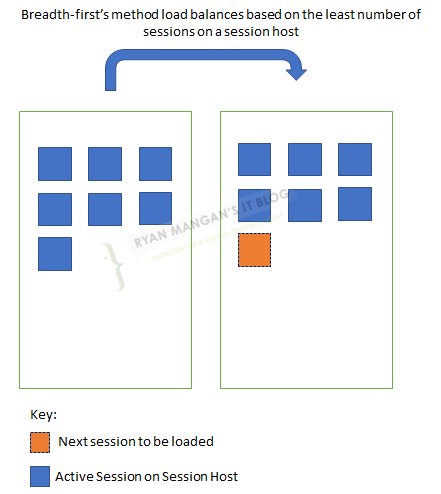
Breadth-first is a good default when:
- Users are sensitive to CPU, memory, or disk contention.
- Sign-ins come in bursts and you want to avoid overloading a small number of hosts.
- You are running heavier knowledge-worker or mixed-application session hosts.
- You want a safer operational posture while learning the real concurrency limits of the pool.
In practical terms, breadth-first reduces the chance that one session host becomes the problem host while other VMs sit mostly idle.
Depth-first: optimize for efficiency and scale-down
Depth-first is the better fit when your priority is cost efficiency and tighter control over the number of active session hosts.
With depth-first, Azure Virtual Desktop places new sessions on the session host with the highest number of sessions that is still accepting new connections and has not yet reached its maximum session limit.
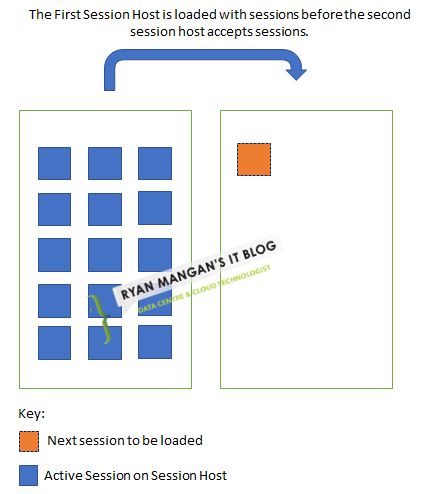
This means depth-first can consolidate demand onto fewer running hosts, which is especially useful when you want to reduce the number of VMs that must remain active outside peak periods.
The design constraint is important:
- Depth-first requires a sensible maximum session limit.
If you do not define a realistic limit, you are not really controlling the risk of user density. Depth-first is only a good design if you already understand the workload mix, profile behavior, and per-host capacity of the pool.
What changed most since 2020
The biggest architectural change is the automation story.
The old WVD guidance often paired load balancing with a dynamic scale script, older broker endpoints, and classic cmdlets such as Set-RdsHostPool. That belongs to the original WVD control-plane era.
For modern Azure Virtual Desktop, the preferred operating model is:
- configure load balancing on the host pool itself
- use scaling plans for schedule-driven autoscale behavior
- validate decisions using Azure Virtual Desktop Insights
That means the old scheduled script walkthrough should now be treated as archive context, not the default implementation pattern.
The best current pattern for pooled host pools
Microsoft’s Well-Architected guidance gives a more useful recommendation than the old one-size-fits-all advice:
- Use breadth-first during ramp-up so morning sign-ins do not stack too aggressively onto a small number of hosts.
- Shift to depth-first during peak, ramp-down, and off-peak if you want better consolidation and lower infrastructure cost.
- Size the host pool around peak concurrent sessions, not total assigned users.
- Target roughly 80-90% usable capacity, not 100%, so you have room for bursts, maintenance, or a bad host.
That hybrid approach is far more realistic than picking one algorithm once and never revisiting it.
Configure it with current tooling
If you want to set the host pool behavior with Azure PowerShell, the modern cmdlet is Update-AzWvdHostPool, not the old Set-RdsHostPool pattern from classic WVD.
$parameters = @{
  Name = "<HostPoolName>"
  ResourceGroupName = "<ResourceGroupName>"
  LoadBalancerType = "DepthFirst"
  MaxSessionLimit = 12
}

Update-AzWvdHostPool @parameters
Use the Azure portal if you want the fastest operational path, and use PowerShell or Azure CLI when you want consistent automation through IaC or repeatable environment configuration.
How to choose between breadth-first and depth-first
Use this as the practical rule of thumb:
- Choose breadth-first when you are optimizing for responsiveness and lower contention.
- Choose depth-first when you are optimizing for VM consolidation and scale-down economics.
If you are unsure, start with breadth-first, gather host telemetry, and only switch to depth-first once you know your real concurrency limit.
Common mistakes I still see
The same design errors keep showing up:
- Treating depth-first as a free cost-saving switch without first validating user density.
- Assuming breadth-first always means the absolute least-loaded host gets selected.
- Leaving the maximum session limit effectively unbounded when moving to depth-first.
- Expecting load balancing alone to solve poor image hygiene, oversized user sessions, or FSLogix bottlenecks.
- Using old WVD script guidance as if it were still the preferred AVD autoscale model.
Load balancing can only place sessions intelligently. It cannot fix bad VM sizing, weak storage design, or poor application behavior.
My recommendation now
For most pooled host pools, start with a conservative design:
- Breadth-first for initial rollout.
- Azure Virtual Desktop Insights enabled from day one.
- A validated maximum session limit based on actual workload testing.
- Scaling plans once usage patterns are clear.
Then, if the environment is stable and your goal is to reduce idle host costs, move more of the day toward depth-first behavior.
That is a far more defensible operating model than the original “set a balancing mode and bolt on an older script” pattern from the first WVD wave.